When I started moving toward the role of an AI Integrator, I experimented with many “typical” AI project patterns and documented the process in my blog. One of the most revealing steps was building a RAG system. As a backend engineer, my instinct was to implement everything on AWS Lambda, but this approach broke almost immediately: LangChain doesn’t fit into Lambda, even with layers or custom bundling, and the cold-start latency makes a chatbot unusable.
I tried a custom Docker-based Lambda runtime, and although it technically worked, it became clear that production RAG systems aren’t deployed this way. Chat workloads need stable, long-lived environments with predictable performance, persistent SDK clients, and no cold starts — something serverless functions cannot guarantee under real conversational traffic. So I built a full containerized architecture on ECS with EC2, reflecting what companies actually run in production. This article walks through that design and the lessons learned from turning a prototype into a realistic deployment. And here is my repository: chatbot-aws-rag.
System overview
I wanted the system to stay as close to free as possible, so I used a free LLM from Hugging Face repository for generation, and Pinecone’s free tier to generate and store embeddings. For deployment, I chose ECS on EC2: Fargate hides too much of the underlying behavior, and Kubernetes adds a learning curve I didn’t need. ECS gives a clear view of how containerized RAG services actually run in production.
Knowledge ingestion is intentionally simple: I upload a JSONL file into S3, the bucket triggers a Lambda, and the Lambda pushes embeddings into Pinecone. This lets me extend the knowledge base just by adding new files. Later, I will integrate a RAGAS pipeline to evaluate how well the chatbot uses this data.
From Upload to Storage: The Data Flow
This system is intentionally simple and universal — a template any business can reuse to deploy a reference-style RAG chatbot. The bot doesn’t maintain memory or conversational state. It only answers one-shot questions based on a domain-specific JSONL file. A company can prepare its own set of questions and answers, upload the file into S3 as a predefined JSONL structure, and immediately get a chatbot grounded in its internal knowledge.
For demonstration, I prepared three domains: transportation, retail, and healthcare. Below are three healthcare examples in the same JSONL structure you use:
{"id":"health-002","question":"Do you accept my insurance provider?","answer":"Yes, we work with major insurance providers, but coverage may vary by plan.","context":"General insurance acceptance guidelines."}{"id":"health-003","question":"How do I request my medical records?","answer":"You can request records online or at the reception desk. Processing takes up to 3 business days.","context":"Procedure for accessing electronic health records."}{"id":"health-001","question":"Can I book a same-day appointment?", "answer":"Same-day appointments are available for urgent cases, depending on doctor availability.", "context":"Clinic scheduling policy for urgent visits."}Each entry contains three useful fields.
question is what incoming customer questions will be semantically compared against.
answer is the text the bot should return when a match is found.
context adds extra detail that improves embeddings and retrieval quality.

All of this is ingested into Pinecone as embeddings. When a user asks a question, the system embeds it, searches for similar entries in Pinecone, and returns the answer from the closest match.
Running the Backend on ECS
A containerized ECS architecture is a better fit for production RAG systems than Lambda because chat workloads require warm, long-lived processes with stable latency and persistent connections to vector databases. Lambda suffers from cold starts, size limits, and unpredictable execution timing, all of which visibly degrade chatbot performance. Containers avoid these issues entirely, providing consistent latency, no startup penalties, full dependency freedom, and reliable runtime control — which is why most production conversational systems run this way. Let’s review the architectural components of the system.
VPC Stack
- VPC across two AZs — provides simple, redundant network isolation for compute and storage.
Compute Stack
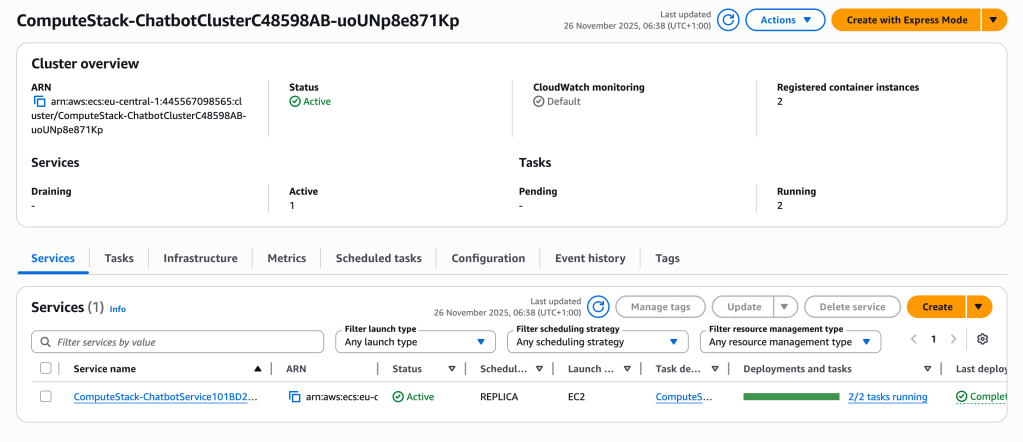
- ECS Cluster on EC2 — the compute pool where ECS tasks run, backed by EC2 instances.
- Spot Auto Scaling Group — provides the EC2 instances for the cluster and maintains the required capacity.
- Capacity Provider — links the ASG to ECS so tasks can be placed and scaled across the EC2 instances.
- Task Definition + SSM Secrets — defines the container image, environment variables, ports, and secrets used by each task.
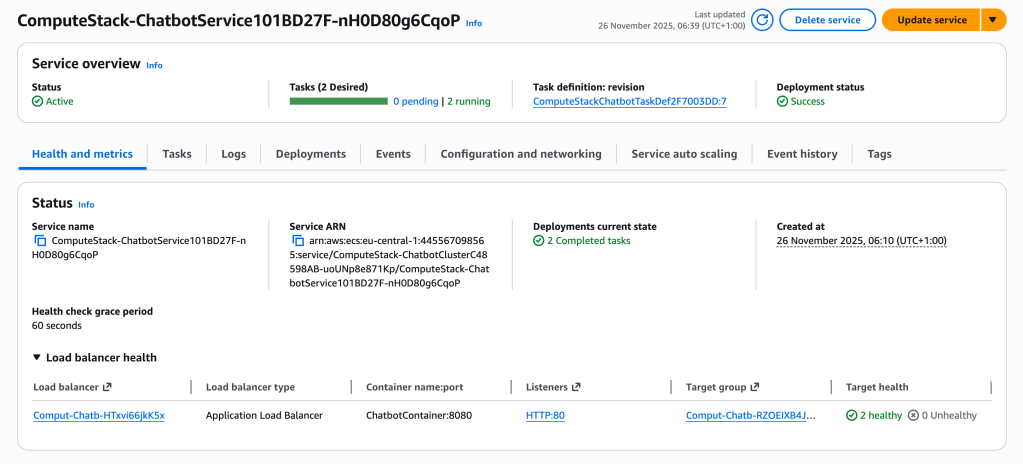
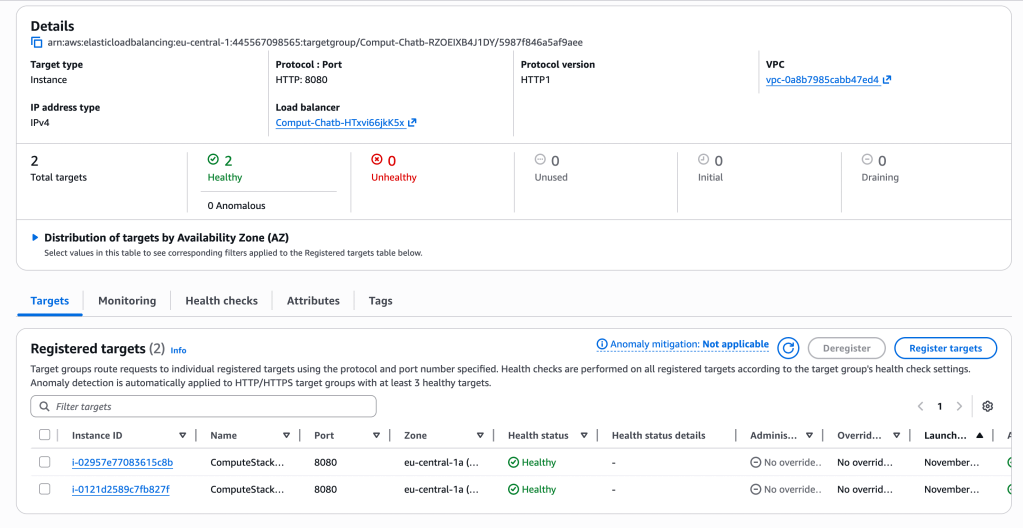
- ECS Service (two tasks) — keeps two running copies of the application container and handles task replacement and health checks.
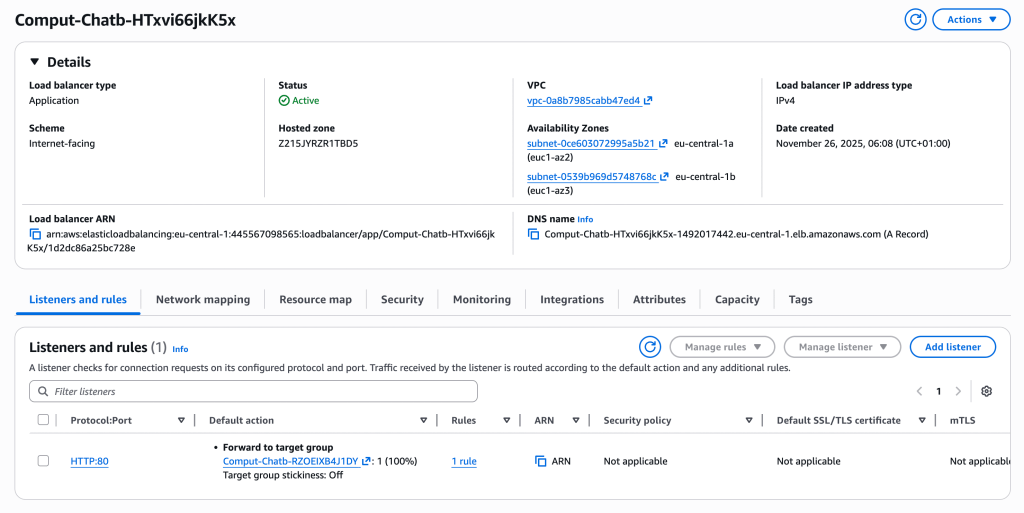
- Application Load Balancer — receives incoming HTTP requests and routes them to the healthy ECS tasks.
- Docker Image — the packaged application (Express server + dependencies) that each ECS task runs.
App Stack
- S3 bucket — ingestion trigger point for domain knowledge files.
- Lambda create-embeddings — parses JSONL, builds text payloads, and pushes embeddings to Pinecone.
- S3 → Lambda notifications — automated ingestion pipeline activated on file upload.
I also chose to use CDK to provision the architecture, partly to start working with a more modern framework compared to Serverless, which has been my main tool, and partly to experiment with provisioning infrastructure through code instead of YAML. Here you can find the stacks I described above.
It was interesting to deploy my stack on AWS and see all the components of the cluster running in action.
Core Runtime Logic
At the center of the system is a Docker-based runtime running on an EC2 task inside ECS. Each task starts a small Express server defined in the image; this server receives incoming chat requests and executes the core logic of the application. This is where LangChain comes into play. LangChain acts as an orchestrator: it lets us structure a retrieval-augmented pipeline, route the user’s question through Pinecone for semantic lookup, and then forward the enriched query to the LLM.
Our pipeline is intentionally minimal: embed the question, retrieve relevant entries from Pinecone, build a prompt that includes both the question and the retrieved domain context, and send that prompt to the model. In more advanced setups the chain could include memory, caching of embeddings, re-ranking, output validation, or multi-step tools, but here we keep it simple to show the core mechanism.
This is an example of the prompt ultimately sent to the LLM:
System:
You are a helpful assistant that answers strictly
using the provided domain context.

User:
Customer question:
<USER_QUESTION>

Relevant knowledge base entries:
<RETRIEVED_CONTEXT>
This works because the request is no longer sent to the model in isolation. The system enriches the question with domain-specific knowledge retrieved from Pinecone, ensuring that the model answers using business-approved information rather than hallucinating. Retrieval provides grounding, and grounding is what turns a generic LLM into a domain-aware assistant.
RAG Inference Examples
To demonstrate that the retrieval step is working correctly, I ran a few queries against the deployed chatbot. Each request goes through the full RAG pipeline: the question is embedded, Pinecone returns the closest domain entries, and the LLM generates an answer grounded in those retrieved results.
Request: “How can I buy a ticket without using the station kiosk?”
{
  "answer": "You can buy a ticket without using the station kiosk by purchasing it online or via our mobile app.",
  "references": [
    {
      "id": "transport-001",
      "question": "How can I buy a train ticket?",
    }
  ]
}
The system correctly retrieves the closest match which is “You can purchase tickets online, at station kiosks, or via our mobile app.” and this match was used to build an answer.
Request: “Is it possible to change my travel plans shortly before departure?”
{
  "answer": "Yes, it's possible to change your travel plans shortly before departure. Changes can be made up to 2 hours before departure, subject to availability.",
  "references": [
    {
      "id": "transport-002",
      "question": "Can I change my travel date after booking?"
    }
  ]
}
And reference answer was “Yes, changes can be made up to 2 hours before departure, subject to availability.”
Request: “What should I do if my train arrives more than an hour late?”
{
  "answer": "If your train arrives more than an hour late, you may request a refund or travel on the next available train.",
  "references": [
    {
      "id": "transport-009",
      "question": "What happens if my train is delayed?"
    }
  ]
}
Reference answer used here was “If your train is delayed by more than 60 minutes, you may request a refund or travel on the next available train.”
Conclusion
Trying a production-grade setup helped me understand how ECS works end-to-end and gave me a chance to provision infrastructure with CDK instead of the Serverless Framework. In the end, I built a small but functional RAG template that I can extend into more advanced versions of the bot.



 SmartCloud
Leave a comment