
I recently achieved success in passing the AWS AI Practitioner exam and wanted to take the opportunity to share my experience, the steps I took to prepare, and the strategies that helped me along the way.

My approach proved to be effective — I performed well across all sections, with no ‘Needs Improvement’ marks. I’d like to share some tips on my preparation plan and the resources I used. One of them is a paid resource, but it’s quite affordable. The entire preparation took me one month, and I was able to balance it with work. I dedicated about an hour each day to studying.

I’d also like to share my thoughts on the emerging hybrid careers in the fields of AI and cloud technologies. As these areas continue to evolve, new roles are being created that combine skills from both domains, opening up new career paths.
A Personal Take on the Exam
I found the AWS AI Practitioner exam to be one of the most exciting certifications I’ve prepared for, even though it’s at the Foundational level. Perhaps it aligns with my personal interests as a backend developer who has always been fascinated by AI and ML. However, transitioning from years of backend development to a junior AI role didn’t seem practical.
The Rise of Hybrid AI Professions
The rapid advancement of generative AI rekindled business interest in this domain. For me, this exam became more than just a test — it was a stepping stone toward a career pivot to Cloud AI Specialist. I believe we are at the cusp of a new wave of hybrid professions combining cloud computing and AI to address some of the challenges businesses face when implementing AI solutions.
Here are a few examples of such professions:
- AI Security Specialists: Responsible for safeguarding businesses from vulnerabilities in generative AI systems.
- Cloud AI Automation Experts: Focused on integrating AI to streamline business workflows.
- Domain-Specific LLM Specialists: Adapt and fine-tune large language models for unique business needs.
- Content Review Automators: Particularly important in fields like law, programming, or healthcare, where accuracy is critical.
Even if you’re not pursuing a career shift, the exam is a great way to build foundational knowledge of generative AI — a skill that’s becoming as essential as basic computer literacy.
Preparation Resources
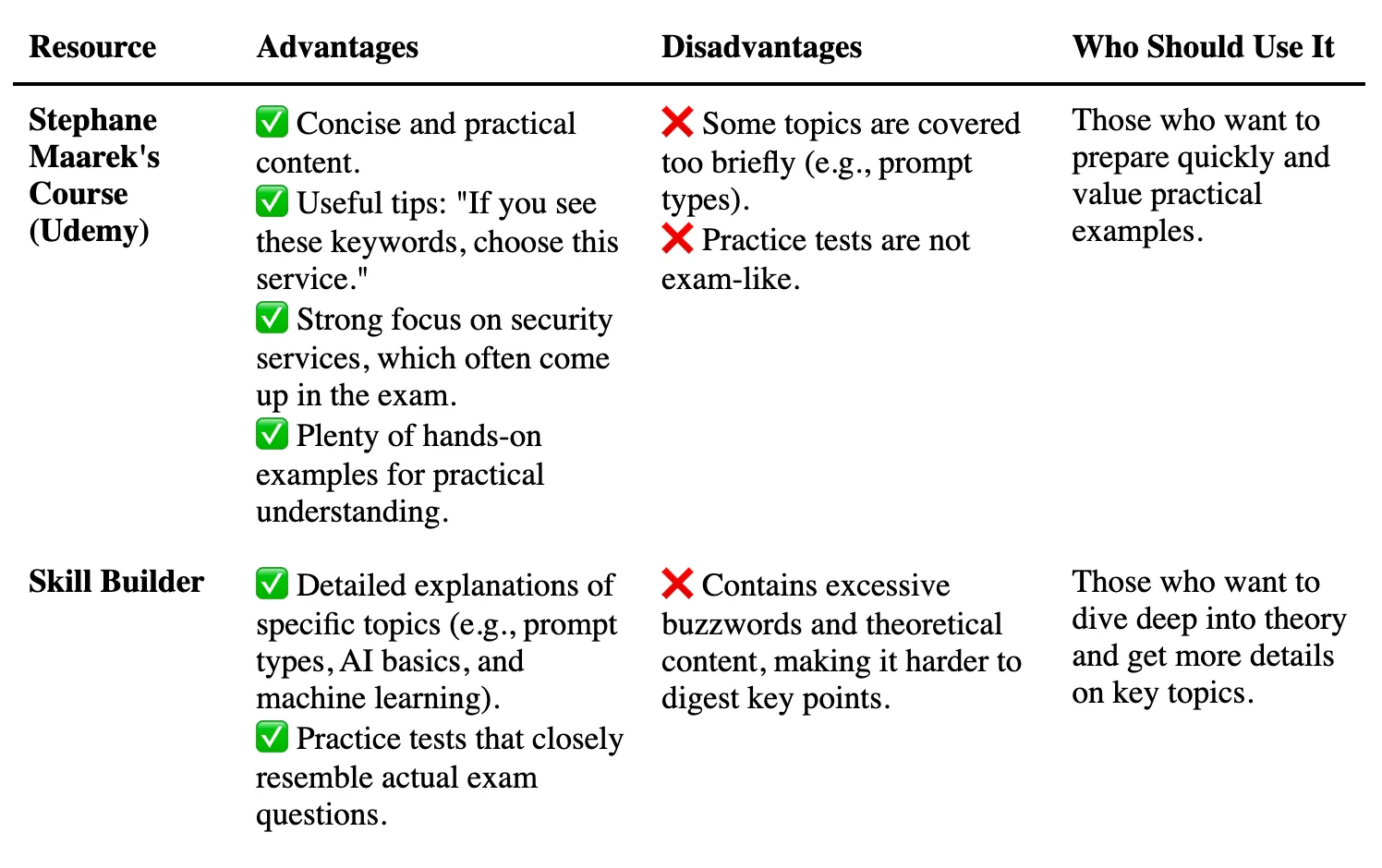
For my preparation, I used two main resources: Stefan Maarek’s course on Udemy and the free materials from AWS Skill Builder. While Udemy course borrows some ideas and slides from Skill Builder, I found the two resources complementary and recommend using both.
Here’s a side-by-side comparison of these resource:
My Study Process
Here are some practical strategies that worked for me:
Use Multiple Resources 📚
Study topics in parallel: for example, watch a segment from Udemy AI Practitioner course, like “SageMaker Deep Dive”, then find the corresponding content on Skill Builder. Review the material and complete practice tests to reinforce learning.
Break Down the Material 🧱
Focus on one section of the course or two topics from Skill Builder each day. This approach helps prevent burnout and improves information retention.
Take Breaks and Revisit Content ⛱️
After completing all the material, take a one-week break, then revisit it to reinforce understanding and identify any gaps.
Create a Summary Document ✍️
Build a reference document with concise notes on key AWS ML services, such as:
- Amazon Rekognition: Image recognition
- RAG: the cheapest option of fine-tuning
This will be helpful for a quick last-minute review.
Master Key AWS ML Services 📌
Get familiar with core services like Polly, Rekognition, Textract, Comprehend, and Bedrock. Many questions on the exam focus on selecting the most appropriate service for a given scenario.
Practice Designing Mini Architectures 📐
Think of real-world situations: for example, which service would you use for text processing — Bedrock or Comprehend? Such exercises are common on the exam. Hands-on videos included in Udemy course demonstrate real business cases, bridging the gap between theory and application.
Try exam sets 📚
Use additional paid or free resources like Practice Exams on Udemy or Tutorial Dojo. These are better for familiarizing yourself with terminology than for simulating the real exam. Skill Builder provides practice questions that are similar to those on the actual exam.
Balance Theory and Practical Insights ⚖️
While Maarek’s practical advice is invaluable, don’t skip over the theoretical content offered by Skill Builder, particularly topics like AI fundamentals and prompt engineering.
What’s Next?
Passing the AWS AI Practitioner exam was just the beginning. Now, I’m focusing on hands-on projects that demonstrate the power of AWS AI services.
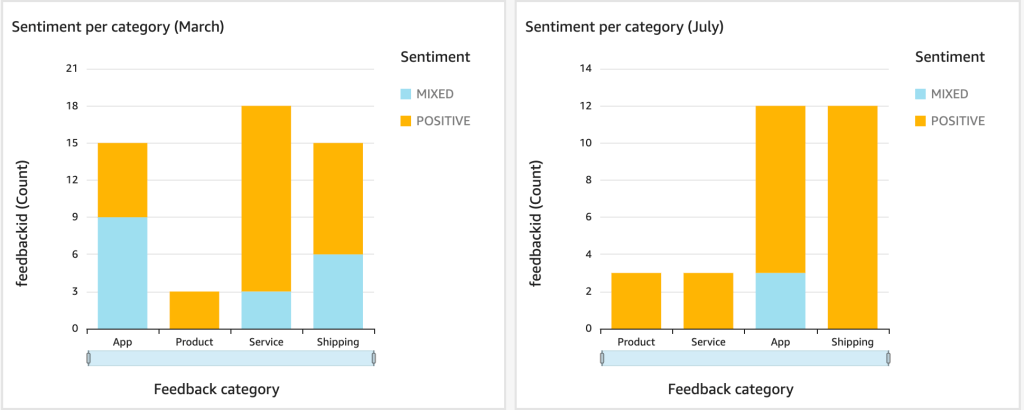
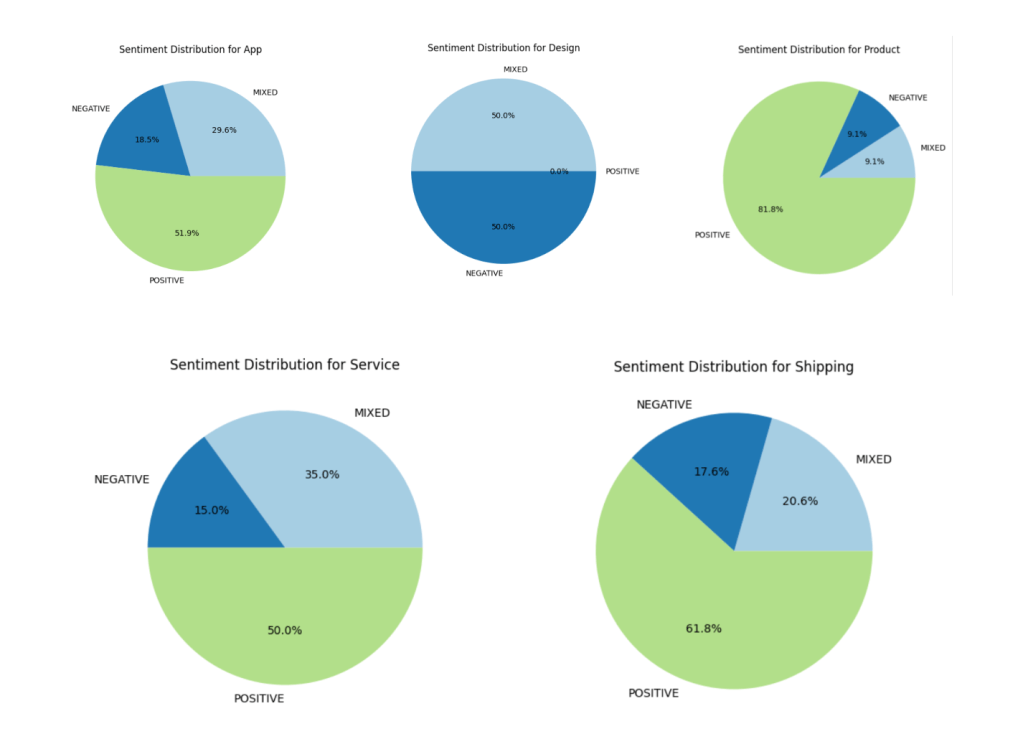
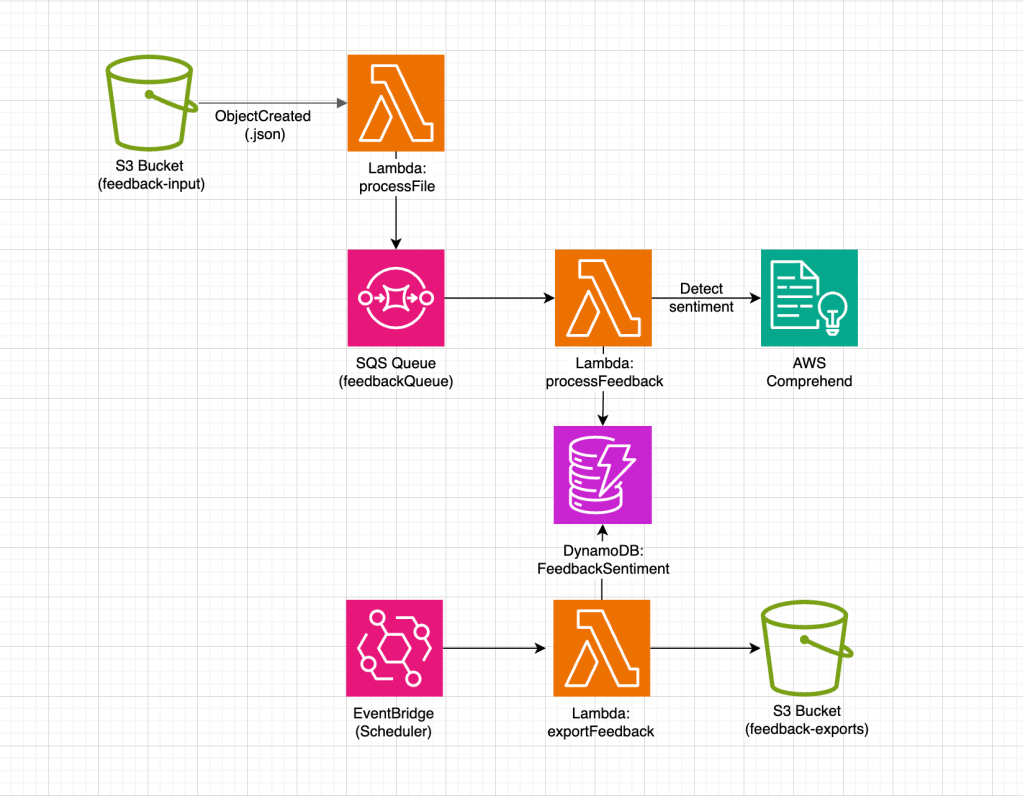
My next project: developing a sentiment analysis dashboard for customer feedback. Here’s the plan:
- Customer feedback data is uploaded to an S3 bucket.
- I plan to create two versions: one where a Step Function orchestrates the workflow and another where messages are sent to an SQS queue. For sentiment analysis, I’ll use Amazon Comprehend.
- Results are stored in DynamoDB and displayed in an interactive QuickSight dashboard through Athena.
This project will allow me to dive deeper into AI pipeline development, sentiment analysis, and data visualization in AWS.




 SmartCloud